Written 2026-10-28. It follows the chapters of
"7 Authentication Concepts Every Developer Should Know" by Hayk Simonyan
(YouTube, about 21 minutes, https://www.youtube.com/watch?v=iX8g4LqF8p8).
Source caveat: the transcript couldn't be fetched. The structure comes from the video's own chapter list and description, and the opening claims from a third-party summary page (https://podwise.ai/episodes/8501314). The explanations below are standard descriptions of each method, not the speaker's wording. Check them against the video before quoting anything as "what he said".
The video's main points:
- Authentication proves who you are. Authorization decides what you may do. Mixing up authentication methods with authorization frameworks is what confuses JWT, OAuth2 and SSO.
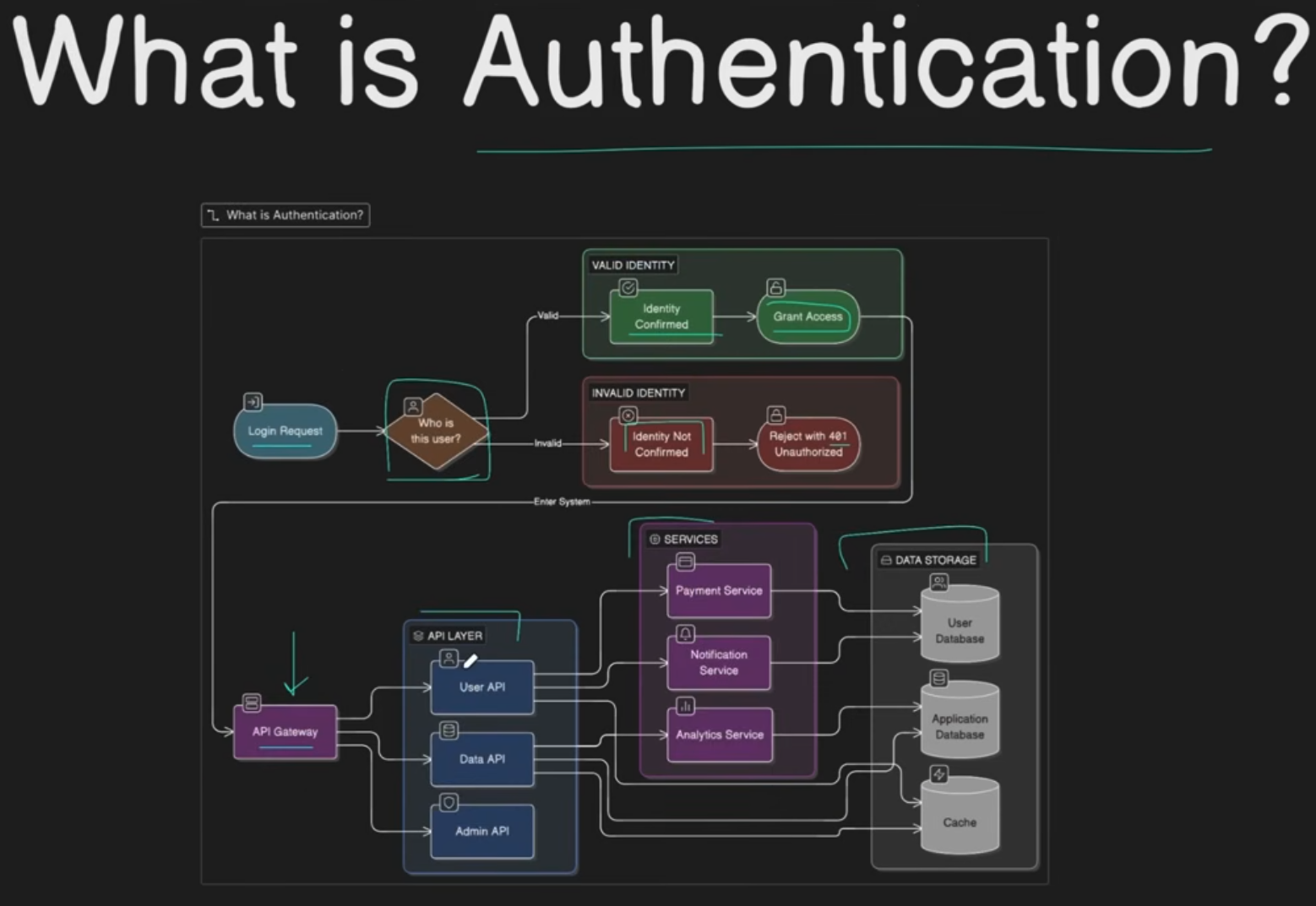
- OAuth2 is an authorization framework, not authentication. OpenID Connect adds the identity layer on top of it.
- SSO is a user-experience pattern, built on a protocol such as SAML or OIDC, not a protocol itself.
- Modern systems lean on stateless tokens: a JWT plus a refresh token.
¶ Overview
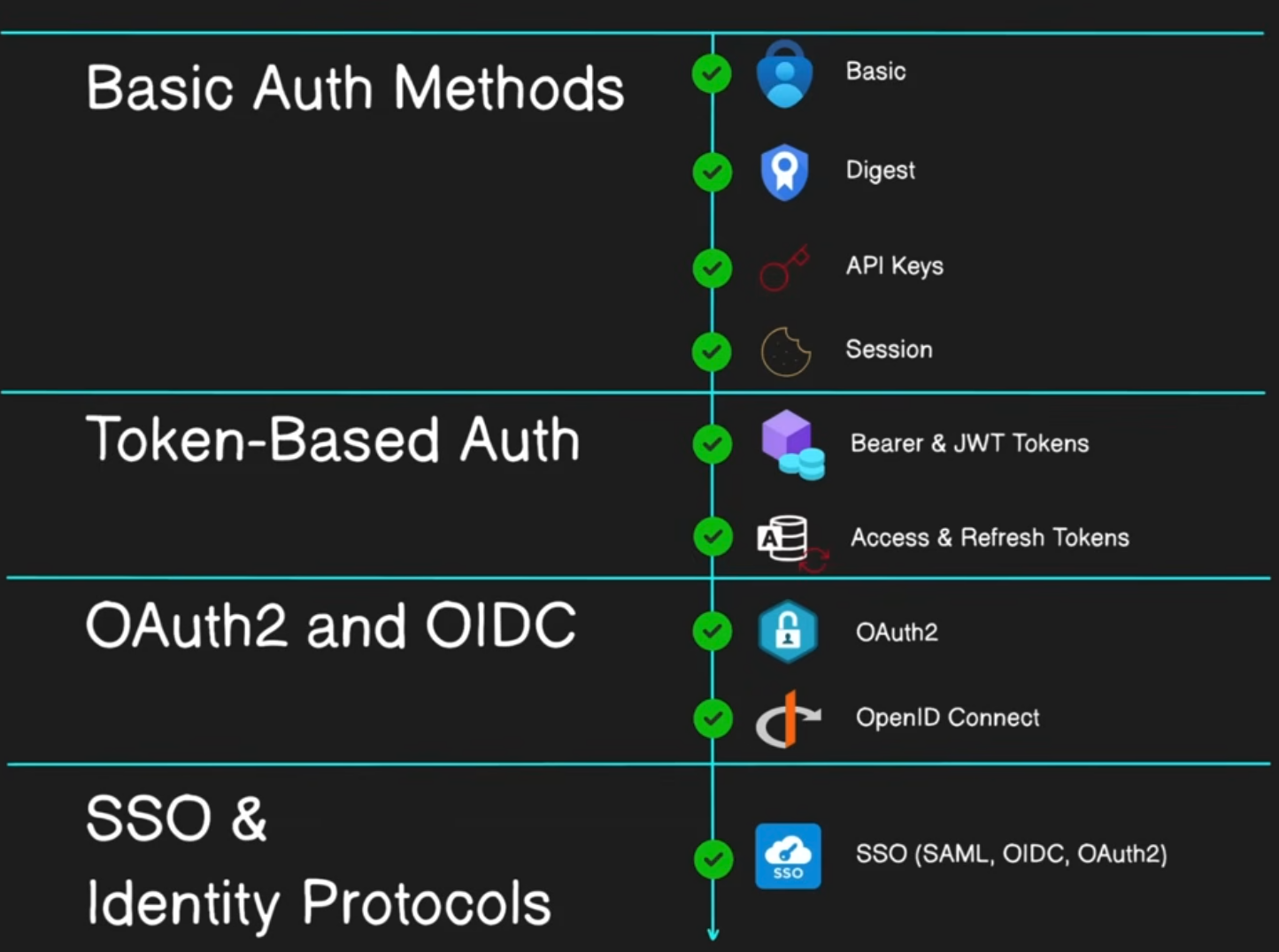
| Auth concept | When to use | One-sentence description |
|---|---|---|
| Basic Auth | Internal tools, quick scripts, always over HTTPS | The client sends username:password base64-encoded in the Authorization header on every request. |
| Digest Auth | Mostly legacy (older devices, some HTTP servers) | The client proves it knows the password by hashing it with a server-issued nonce, so the password never crosses the wire. |
| API keys | Server-to-server calls, public APIs, identifying an application rather than a user | A long-lived secret string, sent in a header, that identifies and meters a calling client. |
| Session-based auth | Classic server-rendered web apps where you control both ends | After login the server stores a session and gives the browser a cookie with its ID, and every request is looked up server-side. |
| Bearer tokens / JWT | APIs, SPAs, mobile apps, services that shouldn't share session storage | Whoever bears the token gets in. A JWT is a self-contained, signed set of claims that any server can verify without a database lookup. |
| Access + refresh tokens | Any token-based system where users stay logged in for days | A short-lived access token is used on each request, and a long-lived refresh token gets new access tokens without logging in again. |
| OAuth2 | Letting an app act on a user's behalf at another service ("let this app read my Google Calendar") | A delegated authorization framework: the user grants an app a scoped access token without ever giving it their password. |
| OpenID Connect (OIDC) | "Sign in with Google/Apple/Microsoft", modern logins, mobile | An identity layer on OAuth2 that adds an ID token (a JWT) saying who the user is. |
| Single Sign-On (SSO) | Organisations with many apps, so one company login covers all of them | A UX pattern: you log in once at an identity provider and every connected app trusts that login. |
| SAML | Enterprise SSO, older corporate apps and identity providers (ADFS, Okta to Salesforce) | An XML-based protocol where the identity provider sends the app a signed assertion through the browser. |
| Authorization | Always, after authentication | Deciding what an authenticated identity may do, for example by role (RBAC) or attributes (ABAC). |
¶ How each one works
¶ Basic Auth
The client encodes user:password in base64 and sends it in the Authorization header with every request. The server decodes and checks it each time.
- Weakness: base64 is encoding, not encryption, so it is only safe over HTTPS.
- Logout: there is none apart from changing the password.
- Exposure: the password is sent on every request.
¶ Digest Auth
The server sends a random nonce, and the client replies with a hash of the username, realm, password, nonce and request. The server computes the same hash and compares. The password is never sent and the nonce prevents replay. It's largely obsolete: it was historically MD5-based and awkward, and HTTPS plus better schemes replaced it.
¶ API keys
The provider issues a random secret per client. The client sends it on each call, usually as X-API-Key: … or a bearer header, and the server looks it up to find the client, its scopes and its rate limit. A key identifies an application, not a person.
Good practice:
- Scope each key to what the client needs.
- Rotate keys.
- Never ship a key in a client that users can inspect, unless it's designed to be public, like Supabase's anon key.
¶ Session-based authentication
Login creates a session record on the server holding the user ID and expiry. The browser gets an HttpOnly cookie with only the session ID, and every request is checked against the session store.
- Strength: logout and revocation are instant, because you delete the session.
- Cost: the server holds state, so with several servers you need sticky sessions or a shared store such as Redis.
- CSRF: cookies are sent automatically, so you need CSRF protection, for example SameSite cookies or tokens.
¶ Bearer tokens and JWT
A bearer token gives access to whoever holds it. A JWT is one kind of bearer token: header.payload.signature.
- Payload: claims such as
sub,exp,audandiss, which are readable by anyone. - Signature: proves the token was issued by the auth server and hasn't been changed.
The API verifies the signature with a key, the public key for asymmetric signing, so it needs no database lookup and stays stateless and scalable. The trade-off is revocation: a stolen JWT stays valid until exp, which is why access tokens are short-lived. This is exactly how Split works, with Supabase as the issuer and ES256 signatures (see JWT.md).
¶ Access and refresh tokens
This splits the job into two tokens:
- Access token: short-lived (minutes to an hour), sent with every API call. If stolen, the damage is limited in time.
- Refresh token: long-lived (days or weeks), stored more carefully, and only ever sent to the auth server to get a new access token.
Refresh-token rotation issues a new refresh token on every use and invalidates the old one, so a stolen, reused one can be detected. Revoking access means revoking the refresh token: the user is out at the next refresh.
¶ OAuth2 (authorization, not authentication)
OAuth2 has four roles:
- Resource owner: the user.
- Client: the app that wants access.
- Authorization server: the service that issues tokens.
- Resource server: the API that holds the data.
The user approves a scope at the authorization server, and the client gets an access token that lets it act on the user's behalf. It never sees the password.
The recommended flow is Authorization Code + PKCE, for web, SPA and mobile alike. The older Implicit and Password flows are discouraged.
An OAuth2 access token says "this app may read the calendar". It does not reliably say who the user is, which is why using bare OAuth2 for login is a known mistake.
¶ OpenID Connect (OIDC)
OIDC is the same flow with scope=openid. The token response then also carries an ID token, a JWT made for the client, with claims such as sub, email, name, iss, aud (the client's ID) and nonce. The client validates that JWT and now knows who the user is. A standard /userinfo endpoint and discovery (/.well-known/openid-configuration, which points to a JWKS) let apps work with any provider without custom code. This is what "Sign in with Google" is.
¶ Single Sign-On (SSO)
SSO is a pattern, not a protocol. Many apps (the service providers) trust one identity provider (IdP). The first app sends you to the IdP to log in. The IdP sets its own session cookie, so when the second app sends you there, you're already logged in and come straight back with no password prompt. Under the hood it's SAML or OIDC.
¶ Identity protocols: SAML vs OIDC
- SAML 2.0: XML-based, from the 2000s and still dominant in enterprise SSO. After login, the IdP posts a signed XML assertion through the browser to the app's endpoint (the ACS URL), and the app verifies the signature with the IdP's certificate. It's browser-centric and awkward for mobile apps and APIs.
- OIDC: JSON and JWT over OAuth2, so it's lighter and works naturally with SPAs, mobile apps and APIs. It's the default for new systems; you still use SAML where the enterprise IdP or app requires it.
¶ Authorization
Authorization comes once identity is established: deciding what that identity may do.
- RBAC: permissions by role, for example admin or editor.
- ABAC: permissions by attributes, for example owner, department or time.
- ACLs and resource policies: permissions attached to the resource itself.
- OAuth scopes: limit what a token allows, not what the user is.
The key separation: a valid JWT tells you who is calling, and your code still has to decide whether they may do the thing. In Split, the token gives the user ID, and membership checks in the repositories decide which groups that user can see.